Online Stamp Maker: Design Your Stamp in Minutes

Loading editor stamp

Popular stamp types

Instructions how to create (draw) a new stamps

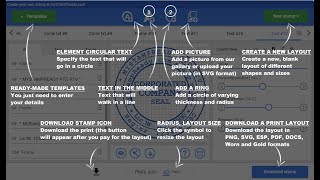
MyStampReady is an online tool that allows you to create your own stamp in minutes — no design skills needed. Choose a template, customize the shape and size, upload a logo, and download your stamp in PNG, PDF, or SVG with transparent background and high resolution. The stamp designer guides you through the whole process — your stamp image is ready to use immediately.

Simple, transparent pricing

Choose the plan that fits your needs. One-time payment, no subscription required.


PROMO
2.5$
Create an online stamp in just a few clicks with a user-friendly interface. Perfect for quick and simple tasks without extra setup.
FORMATS INCLUDED
PNG
MOST POPULAR
ECONOM
3.5$
Use powerful design tools to build a custom design and create a detailed digital seal for your needs. This plan gives you more control and flexibility when working with your design.
FORMATS INCLUDED
PNG
SVG
EPS
VIP Word
5.5$
Create professional stamps with a personalized approach and get high quality results for business and advanced use. This plan is ideal for users who need more precision and a polished final design.
FORMATS INCLUDED
PNG
SVG
EPS
PDF
DOCS

Popular stamp templates

Stamp received
Stamp received
Custom Stamps production company
Custom Stamps creation service
Custom Stamps making equipment
Custom Stamps crafting supplies
Custom Stamps manufacturer
Custom Stamps engraver
Custom Stamps designer
Custom Personalized stamps creator
Custom Rubber stamps maker
Custom Stamp Maker
Custom Stamp Maker

Company stamp and business seal

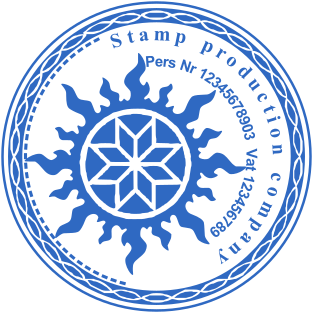
Need a stamp with your company name, address or registration number? Pick a round or rectangular layout, type your details, add your logo and download the file for invoices, contracts and letters. Use the PDF or Word file to stamp documents on screen, or the vector SVG or EPS file to order a company seal from a local stamp shop. Ready-made layouts are in our company seal templates.

Use your design for a rubber stamp

Want a stamp you can hold? Design it here, download the SVG or EPS file and send it to any rubber stamp maker or office supply store that makes stamps to order. Vector files scale to any plate size without losing quality, so the shop can engrave exactly what you see on screen. We don't make or ship stamps ourselves — you get the file and choose the producer.

What Users Say

Thousands of people have already created their stamp with MyStampReady. Here's what they think.

Google Maps
Excellent, Smart work, Completed the design with 10 minutes. Even I face the issue, they contacted me and fixed it. 100% Geniune. Thank you So much you make the work simple. Thank you Again.
V
Vinothkumar Savaridass
Small business owner
Trustpilot
Very easy to use platform. Heaps of seal templates to pick from. Nice, fluid interface. Have used this several times so far to quickly create a new stamp or seal. Excellent support team. Recommend highly.
D
David Tron
Small business owner
The best stamp maker ever This stamp maker from mystampready.com is really very good, it was very easy to create a rubber stamp. The shabby stamp option was perfect for me. I created the stamp and pasted it into a pdf file. Good job guys
J
Johannes S.
Small business owner


Stamp maker: frequently asked questions

Still have questions? Our support team is always ready to help.


Is the stamp maker free?

Designing, saving and previewing your stamp is free, and you can download a PNG sample with a watermark. To get the final file without a watermark, choose a plan: PNG for $2.5, PNG + SVG + EPS for $3.5, or all formats including PDF and Word (DOCX) for $5.5. It is a one-time payment, no subscription.

How do I create a stamp online?

Open the stamp maker on this page — no installation or design program required. Choose the shape you need: round, oval, rectangular or triangular, or start from a ready template. Add text around the circle and in the center, upload a picture or logo, set the plate size in millimeters, then preview the result and download your file in minutes.

What design options are available?

You control every element of the layout: shape, size, border width, line thickness, fonts, colors and text position. Upload your logo, add icons, lines and images, or apply the vintage aging effect for a hand-stamped look. Start from scratch or from one of the ready-made templates and change anything you like.

What is the difference between a stamp creator and a stamp generator?

A stamp creator is an editor where you design the stamp yourself and control every detail: fonts, colors, branding, icons and images. A stamp generator asks for basic details — name, number or address — and builds a layout for you automatically. Our online stamp maker works both ways: pick a template and just enter your details, or design the stamp from scratch.

What file formats can I download and what is the quality?

PNG has a transparent background and 600 dpi resolution, ready for digital documents. SVG and EPS are vector formats: they scale to any size without losing quality and work with print services. PDF opens on any device, and DOCX is ready to insert into Word. Which formats you get depends on your plan.

Can I turn my design into a physical rubber stamp?

Yes. We sell digital files and don't ship stamps, but your SVG or EPS file is all a stamp shop needs. Send it to any rubber stamp maker, embosser or office supply store to make a self-inking, pre-inked or wooden stamp. Turnaround time depends on the producer you choose.

Can I edit my stamp after creating it?

Yes. Save your layout with the Save button and return to the stamp designer at any time to change the text, font, color, shape or size, add or remove images and icons, and download a new version.

Why does my PNG stamp have a black background?

Your file actually has a transparent background — some devices display transparency as black. This is normal. Open the file in any image editor or paste it into your document, and the background will display correctly.

Where can I use my digital stamp?

Digital stamps work in business, legal, medical, real estate and other paperwork. Apply your stamp to PDFs, Word files, letters and certificates, or use the vector file to order a physical stamp for everyday use.

Do I need graphic design skills to make a stamp?

Not at all. Pick a shape — round, oval, triangular or rectangular — or start from a template, type your text and adjust fonts, borders and images. No CorelDRAW, Photoshop or Illustrator needed: everything works in your browser.